Minecraft Add-Ons Explained: How Bedrock Custom Content Works
Add-ons bring custom mobs, blocks and behaviours to Bedrock Edition using behaviour and resource pack pairs. Here is how they work and what to watch out for.
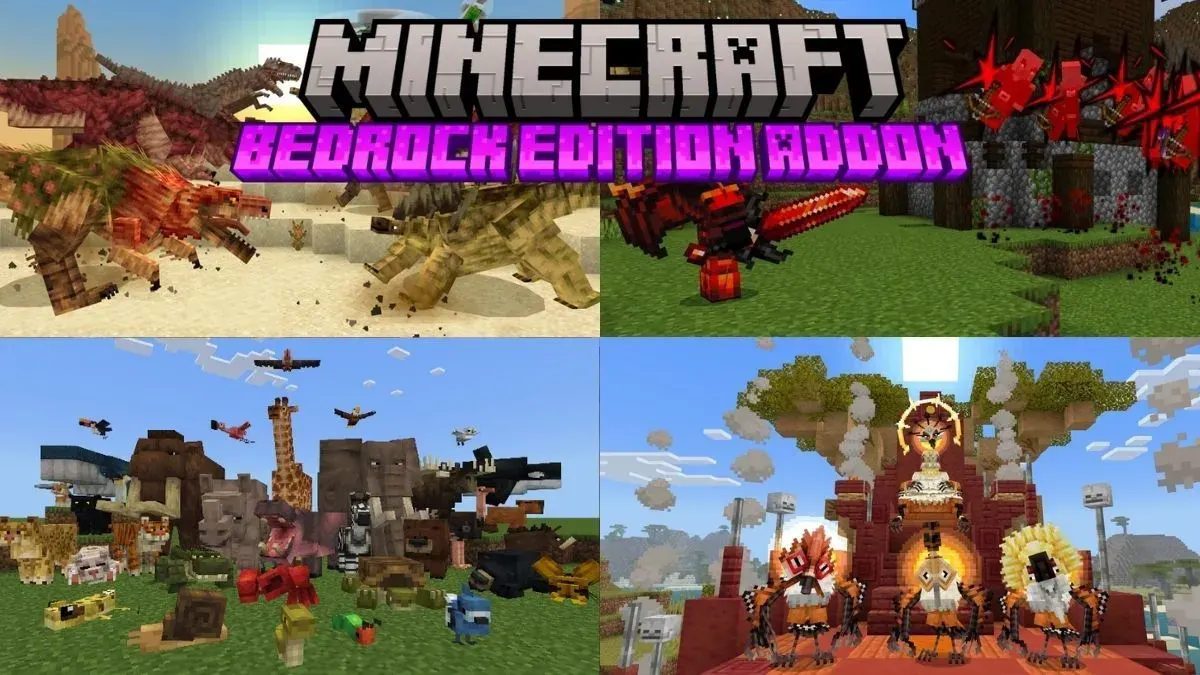
Add-ons bring custom mobs, blocks and behaviours to Bedrock Edition using behaviour and resource pack pairs. Here is how they work and what to watch out for.
Add-ons are Bedrock Edition's official way of adding custom content — new creatures, blocks, items and behaviours — without the open code access that Java mods enjoy. They are built from packs: a behaviour pack that defines how things act, usually paired with a resource pack that defines how they look, and together they can bend Minecraft into shapes the base game never offered.
What is the difference between behaviour and resource packs?
The resource pack is the skin: textures, models, sounds and animations. The behaviour pack is the brain: it defines what a mob does, what a block drops, how an item works and how the pieces interact. An add-on that adds a rideable dragon needs both — the resource pack draws the dragon, the behaviour pack makes it fly, breathe and listen. Behaviour packs are where add-ons get their power, because they let creators change rules the base game normally keeps fixed.
What kinds of add-ons exist?
The range is broad. Some add a handful of new animals or crops; others introduce magic systems, vehicles, furniture sets, new dimensions or whole survival overhauls with thirst, temperature and seasons. Because add-ons are written in the game's own documented formats, they work across the whole Bedrock family — Windows, mobile, Xbox, PlayStation and Switch — which is their great advantage over Java mods. A creator builds once, and everyone on Bedrock can use it.
How are add-ons applied to a world?
Add-ons are switched on per world rather than for the whole game. When you create or edit a world, you activate the behaviour and resource packs you want, and they become part of that world's setup. Some add-ons also need experimental features turned on in the world settings, because they use systems Mojang has not fully finalised — the add-on's description will say so. Once a world has been played with a behaviour pack, removing it can leave gaps or odd behaviour, so it is wise to experiment on a copy or a fresh world first.
Why do add-ons turn off achievements?
This catches many players out: activating behaviour packs in a world generally disables achievements for that world. The reasoning is fair enough — achievements are meant to measure progress in the standard game, and a behaviour pack can rewrite the rules entirely. Resource-pack-only changes are cosmetic and do not carry the same penalty. If you are chasing achievements, keep a separate clean world for it, and treat your add-on world as the place where the rules are yours.
Are add-ons the same as Marketplace content?
- Marketplace content — official, curated and paid; installed through the in-game store with support and quality checks.
- Community add-ons — free downloads from creator sites; installed manually as pack files, quality varies.
- Java mods — far more powerful, but PC-only and unofficial.
How do you choose good add-ons safely?
Stick to established creator sites, check that the add-on matches your current game version, and read recent comments — Bedrock updates occasionally break older add-ons, and the community reports it fast. Download pack files rather than anything that asks to install a program. Start with one add-on at a time so that if something misbehaves, you know exactly which addition caused it. Used with a little care, add-ons are the best way to keep Bedrock feeling new between official updates.
What can add-ons not do?
It is worth knowing the limits before you go shopping or downloading. Add-ons work within Bedrock's official systems, so they cannot rewrite the game as freely as Java mods can — there is no add-on equivalent of the biggest Java technology or dimension mods, and some ideas simply exceed what the pack formats allow. Performance is the other ceiling: an add-on that spawns hundreds of custom entities will strain a phone or an older console long before it troubles a gaming PC, because all Bedrock devices share the same content. None of this makes add-ons weak — the best creators do remarkable things inside the rules — but it does mean setting expectations differently from the Java modding scene, where almost nothing is off the table.
Finally, remember that add-ons belong to the world they are activated in, not to your account as a whole. A new world starts clean unless you deliberately switch the same packs on again during its creation.
Frequently Asked Questions
Are add-ons available on consoles?
Yes. Add-ons are a Bedrock feature and work across Windows, mobile and consoles. Content bought from the Marketplace installs automatically; manual file installs are easiest on Windows and mobile.
Do add-ons disable achievements?
Activating behaviour packs generally disables achievements in that world, because the game's rules can be changed. Purely cosmetic resource packs do not have the same effect.
What is the difference between an add-on and a mod?
Add-ons use Bedrock's official pack formats and work on all Bedrock platforms, but are more limited. Java mods run custom code and can change far more, but only work on Java Edition for PC.
Can you remove an add-on from a world?
You can deactivate packs, but worlds played with behaviour packs may keep odd traces, and custom blocks or mobs will vanish. Test add-ons on a copy or a fresh world first.